Bring your brokerage accounts into OpenBB with SnapTrade Personal
Connect your investment accounts once, then explore your portfolio alongside market data, research, and AI inside OpenBB.
Published August 5, 2026 · SnapTrade
Your portfolio should be part of your research workflow
Investment research is more useful when it reflects the portfolio you actually own. But for many investors, portfolio monitoring and market research still happen in separate places.
You may research companies, economic trends, and market events in one tool, then open several brokerage apps to check your positions, cash, buying power, recent orders, and account activity. That gets even more cumbersome when your investments are spread across multiple institutions.
SnapTrade Personal helps bring those pieces together. By connecting supported brokerage accounts through SnapTrade Personal, you can make your authorized portfolio data available in OpenBB and review it alongside the market information and research you already use there.
Why OpenBB?
OpenBB brings together market data, company research, economic indicators, and AI in a single workspace designed for investment analysis.
For SnapTrade Personal users, that means you do not just see your brokerage data in another dashboard. You can analyze your connected portfolio alongside the information that helps explain it. Whether you are researching a company, tracking a sector, or exploring market trends, your own holdings are available in the same workspace.
With SnapTrade providing brokerage connectivity and OpenBB providing research and analysis tools, you can spend less time switching between applications and more time understanding how market events relate to the investments you actually own.
What you can see in OpenBB
Depending on what your brokerage makes available, you can use OpenBB widgets to explore information such as:
- Portfolio value and positions
- Cash and buying power
- Cost basis and unrealized profit and loss
- Recent orders and account activity
- Historical account balances
- Quotes and supporting brokerage reference data
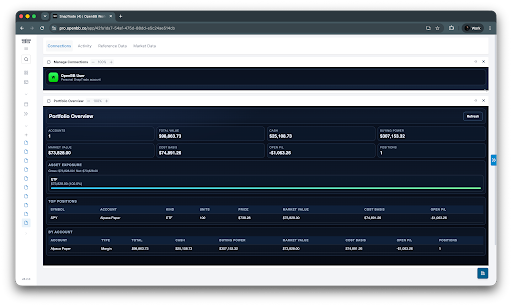
The Portfolio Overview widget provides a high-level view of your connected investments, while Orders, Activities, and Balance History help you understand what has changed and how your account reached its current state.
Data availability and freshness depend on the connected brokerage, the type of data requested, and the capabilities of the underlying integration.
Research your real portfolio, not a manually recreated one
The biggest benefit for SnapTrade Personal users is relevance. Instead of building and maintaining a separate watchlist or mock portfolio, you can work with data from the investment accounts you have chosen to connect.
For example, before an earnings-heavy week, you could review which companies you already own, how large those positions are, how much cash or buying power is available, and whether recent orders or account activity have changed your exposure. You can then continue researching those companies, sectors, and market conditions in the same workspace.
This makes it easier to move from a broad market question to a portfolio-specific one without repeatedly switching between research tools and brokerage dashboards.
Ask questions about your portfolio
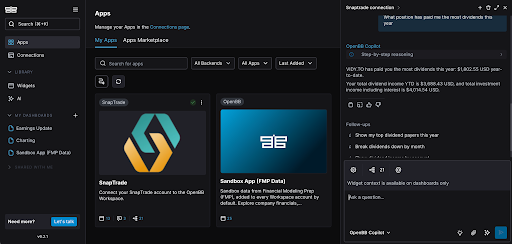
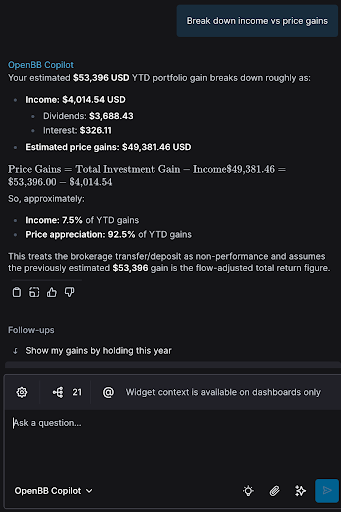
SnapTrade also has an MCP server, which means OpenBB Copilot or another agent can work with your connected brokerage data directly.
So instead of opening each widget one by one, you could ask something like, “How does my portfolio’s cash position compare with what’s happening in the market this week?” The agent can pull your brokerage balance through SnapTrade, compare it with connected market data, and give you one combined answer.
You can ask questions about your investments the way you’d ask a friend, and get back real information about your portfolio.
How SnapTrade Personal fits in
SnapTrade Personal gives individual investors a way to connect their own supported brokerage accounts and use that data with compatible applications and AI tools.
SnapTrade provides the connection that allows authorized account information from supported brokerages to be made available to OpenBB. SnapTrade is not a brokerage and does not hold your investments. Your accounts remain with the institutions where they are already held.
How to get started
- 1
Create or sign in to your SnapTrade Personal account.
- 2
Connect one or more supported brokerage accounts.
- 3
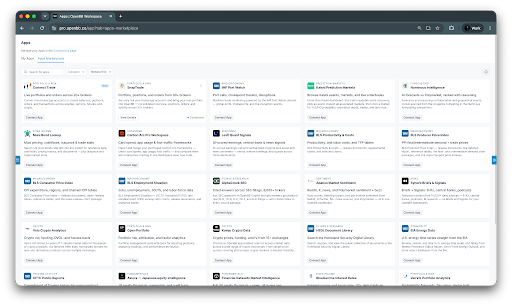
Open the SnapTrade app in the OpenBB App Marketplace.
- 4
Complete the authentication steps shown in OpenBB.
- 5
Add the SnapTrade widgets to your workspace, or use OpenBB Copilot to explore your connected brokerage data.
To check whether your institution is supported, visit the SnapTrade Brokerage Access Guide.
A more connected way to understand your investments
OpenBB gives investors a place to work with market data, research, analytics, and AI. SnapTrade Personal adds the missing portfolio context by making data from your connected brokerage accounts available in that workflow.
Together, they make it easier to research the market in relation to the investments you actually own, whether you prefer reviewing dashboards or asking questions through an agent.