What’s new in SnapTrade: October 2026

· SnapTrade

What’s new in SnapTrade: October 2026, covering SnapTrade Commercial and SnapTrade Personal

SnapTrade Commercial

Let users reuse an existing brokerage connection

Users with a SnapTrade Personal account can now sign in through your app’s Connection Portal and share an existing brokerage connection with your app, instead of connecting it again. Users new to SnapTrade can create an account and connect their brokerage there too.

There are no code changes on your side: shared connections work through your existing API integration.

Connection sharing is on by default for new Commercial customers and is rolling out gradually to existing customers. Contact us if you’d like it sooner.

More detailed account balances (beta)

Retrieve total account value, cash by currency, buying power and margin borrowing through the new Balances v2 endpoint. Available fields vary by institution. Contact SnapTrade to enable access.

Identify cash and margin accounts

Use the new cash_or_margin field in account details to distinguish cash and margin accounts. It returns unknown when the distinction cannot be determined.

Manage brokerages for each API key

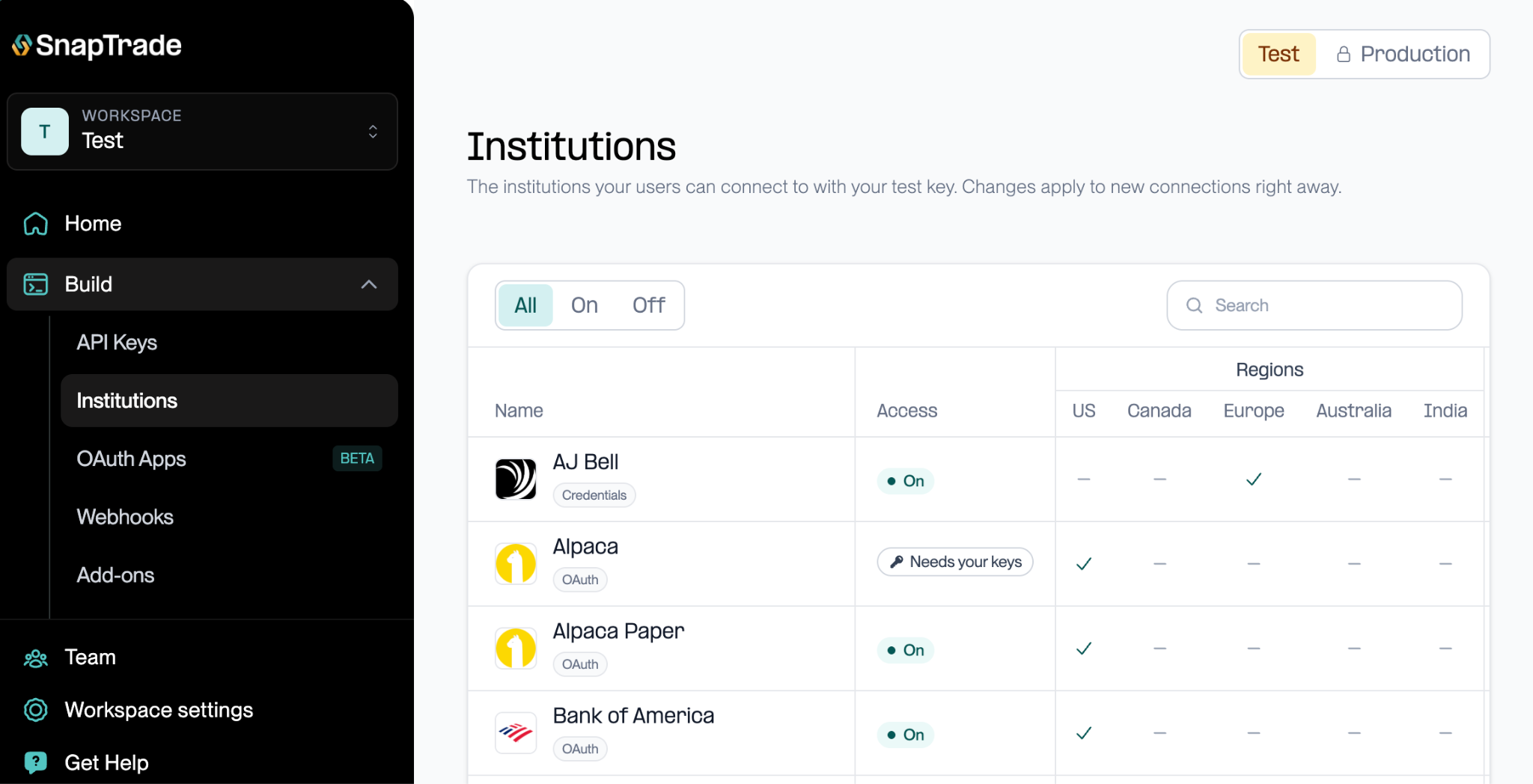
See which brokerages each API key can access and what setup or approval they require. Workspace admins can enable or disable eligible integrations on the Institutions page.

The Institutions page in the SnapTrade dashboard, listing each institution with its access status and supported regions

Stock and crypto trading in the sandbox

Test stock and crypto orders with Commercial test keys and expanded sample holdings. Sandbox trading excludes options, Commercial production keys and existing read-only connections.

Account list and details endpoints

Use List all user accounts to retrieve accounts across a user’s connections, or Get account details for one account. Both identify account types. The list uses cached data; account-detail freshness depends on your plan.

Usage Stats API (beta)

Use the Usage Stats API to track user and connection counts and the value of connected assets. Counts may be up to five minutes old; asset values use a daily snapshot.

Brokerage updates

  • Wells Fargo: Better recognition of supported WellsTrade IRA accounts and correct identification of supported option transactions. IRA holdings data depends on what Akoya provides.
  • IBKR Flex: More reliable connection setup when brokerage rate limits are reached, plus bond prices based on broker-reported market values when available.
  • Trading 212: Interest on uninvested cash is now included in supported transaction imports. Older missing entries may need a historical resync.
  • TD Direct Investing and Qtrade: Refresh requests now indicate when a user needs to reconnect.
  • BMO: Improved account labels, transaction types and symbol matching for securities no longer held.

Developer updates

  • TypeScript SDK 13.1.0 adds stricter types, including unknown for response fields without a defined type. Review affected code when upgrading.
  • Return users to your native app after OAuth authorization with support for reverse-domain URL schemes.
  • You can now enable Account Value History on eligible test keys from the Add-ons page to test your integration. This beta uses estimated values that may have gaps.

Dashboard and account updates

  • Workspace admins can now rotate Enterprise production API keys with two-factor verification.
  • Improved layouts, menus and pop-up windows to make SnapTrade easier to use on mobile.
  • Find optional features for each API key on the Add-ons page. Access to management controls depends on your workspace role.
  • Transaction syncs interrupted by a service restart now retry automatically.

SnapTrade Personal

Use an existing connection with another app

When a participating app asks you to connect a brokerage, sign in to SnapTrade and choose an eligible connection you already have. You can stop sharing with an app from Connected apps while keeping your own connection.

Connect more institutions with AI

Connection Builder uses AI to help you connect an institution SnapTrade doesn’t support yet. Access is gradually rolling out to Personal users.

More ways to use SnapTrade with AI tools

Use SnapTrade’s read-only MCP server with compatible AI tools. Features vary by tool and account.

  • Ask for your Wealth Rank through MCP.
  • Portfolio and income summaries now cover up to 200 accounts. If you have more, the tools include your largest accounts and flag the exclusions.
  • Find compatible apps and receive optional updates about your connections and daily syncs.

Tax-lot data

Turn on tax-lot data in your Personal dashboard to see purchase and cost-basis details. It is off by default, and coverage varies by brokerage, account and investment.

Institution updates

  • You can now connect eligible Bank of America, Merrill and Capital One accounts to SnapTrade Personal.
  • Wells Fargo: Better recognition of supported WellsTrade IRA accounts and correct identification of supported option transactions. IRA holdings data depends on what Akoya provides.
  • IBKR Flex: More reliable connection setup when brokerage rate limits are reached, plus bond prices based on broker-reported market values when available.
  • Trading 212: Interest on uninvested cash is now included in supported transaction imports. Older missing entries may need a historical resync.
  • TD Direct Investing and Qtrade: Refresh requests now tell you when to reconnect your brokerage.
  • BMO: Improved account labels, transaction types and symbol matching for securities no longer held.

Dashboard and account updates

  • Improved layouts, menus and pop-up windows to make SnapTrade easier to use on mobile.
  • Manage your brokerage connections from the new Connections page in the sidebar.
  • Browse brokerages, supported regions, sign-in options and trading support on the Institutions page.
  • Transaction syncs interrupted by a service restart now retry automatically.

Building your own investing tools?

  • Retrieve account value, cash, buying power and margin borrowing through Balances v2, currently in beta. Coverage varies by institution. Contact SnapTrade to enable access.
  • Identify cash and margin accounts using the cash_or_margin field in account details.
  • Test stock and crypto orders in the sandbox with eligible non-production keys. Options and existing read-only connections are not supported for trading.
  • Retrieve your accounts across connections with List all user accounts, or look up one with Get account details. Both identify account types; list results use cached data.
  • TypeScript SDK 13.1.0 provides clearer types to help you catch incorrect assumptions about API data.