Connect brokerage accounts with SnapTrade OAuth

Launch with more brokerages, scale free and freemium products, and open a path to distribution through the SnapTrade App Directory.

How SnapTrade OAuth fits into your app

SnapTrade OAuth is another way to connect brokerage accounts to your app.

Instead of your app creating and managing a SnapTrade user for each person, the user connects through SnapTrade Personal and gives your app permission to access their brokerage connections.

Your app still uses the SnapTrade API and can keep its own login, users, database and product experience.

You can use the API flow, OAuth, or both.

Why use SnapTrade OAuth?

Get a path to distribution through the SnapTrade App Directory

OAuth apps can be considered for the SnapTrade App Directory, where Personal users can discover apps and authorize access to eligible brokerage connections. Inclusion is curated and not guaranteed, but it can give high-quality apps an additional distribution channel.
Great for free and freemium products

SnapTrade OAuth currently has limited-time introductory pricing. Personal users who authorize your app through OAuth do not have a per-user OAuth charge during this period. That can make OAuth a strong fit for free apps, freemium products and trials. Production still requires a paid plan, so check Pricing for current terms.

Offer more broker access, faster

Brokerages available through SnapTrade Personal are available to OAuth apps without the separate broker-by-broker approval process that can apply to the API flow.

Add more brokerages with less work

As SnapTrade adds more brokerages to SnapTrade Personal, OAuth apps can take advantage of that growing coverage without going through a separate app-level broker approval for each one. Availability and capabilities can still vary by brokerage, account and connection.

Make connecting easier for users

If a user already connected a brokerage in SnapTrade Personal, they can authorize your app to use that connection instead of connecting the same brokerage again. The same Personal connection can be authorized to more than one OAuth app.

Manage less connection infrastructure

Your app does not need to create and manage a separate SnapTrade user and brokerage connection for every Personal user. SnapTrade Personal handles the Personal account and brokerage connection while your app keeps its own login, users and product experience.

How do the API and OAuth flows differ?

Both flows call the SnapTrade API. What changes is who sets up and manages the SnapTrade user and brokerage connections, and how your app is authorized to access them.

API flow

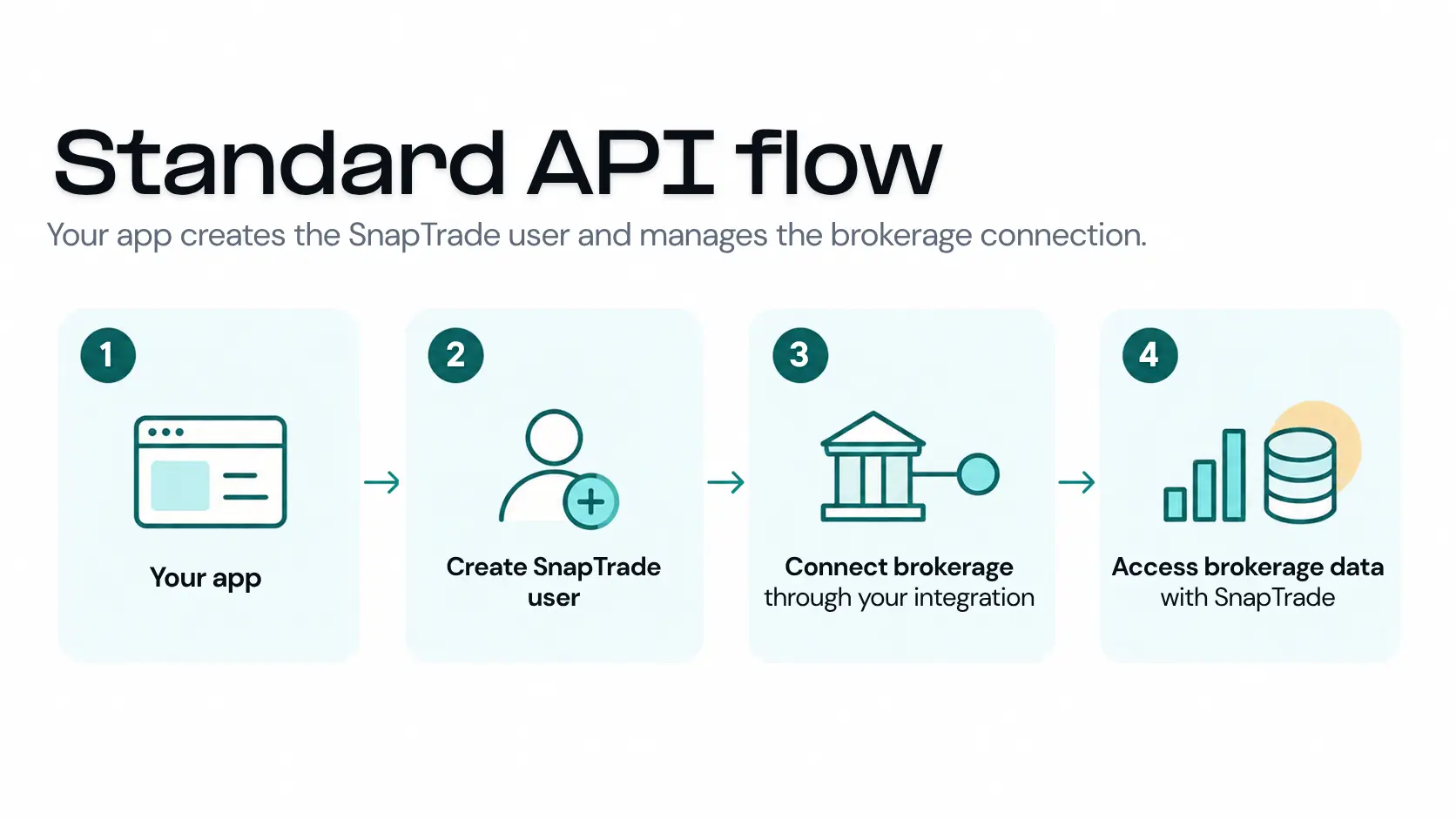
Your app creates the SnapTrade user → the user connects a brokerage through your integration → your app accesses that user's brokerage data.

Standard API flow: your app creates the SnapTrade user and manages the brokerage connection. 1. Your app. 2. Create SnapTrade user. 3. Connect brokerage through your integration. 4. Access brokerage data with SnapTrade.

SnapTrade OAuth

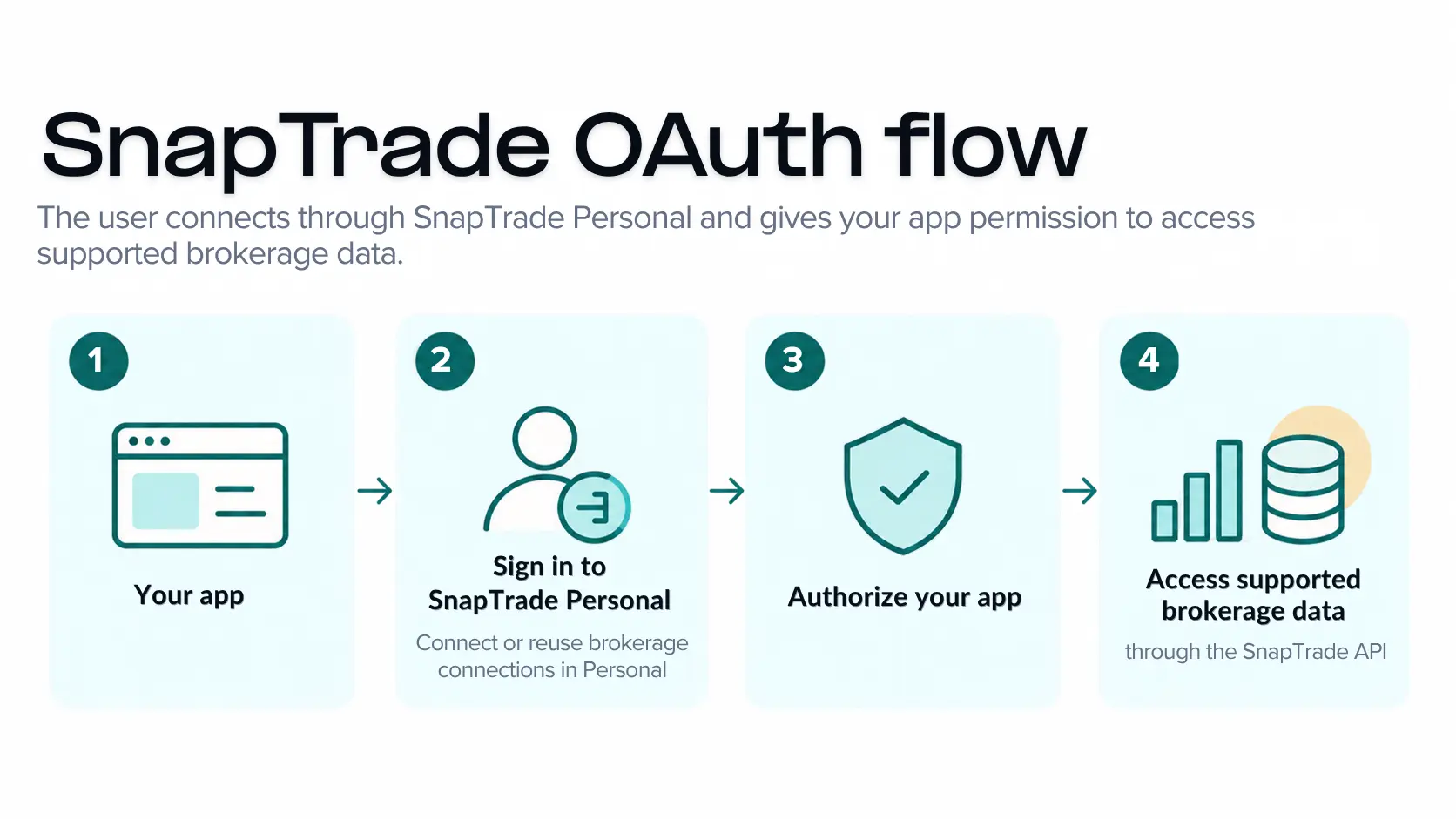
The user signs in to SnapTrade Personal → authorizes your app → your app accesses supported brokerage data through the SnapTrade API.

SnapTrade OAuth flow: the user connects through SnapTrade Personal and gives your app permission to access supported brokerage data. 1. Your app. 2. Sign in to SnapTrade Personal: connect or reuse brokerage connections in Personal. 3. Authorize your app. 4. Access supported brokerage data through the SnapTrade API.

Key differences at a glance

Who sets up the SnapTrade user?API flowYour appOAuth flowThe user, through SnapTrade Personal
Who manages brokerage connections?API flowYour app, through your SnapTrade integrationOAuth flowThe user, in SnapTrade Personal
Can existing Personal connections be reused?API flowSeparate connection for your integrationOAuth flowYes - eligible Personal connections can be reused
Brokerage approvalAPI flowApp-level broker approval may be requiredOAuth flowNo separate app-level approval for Personal-supported brokerages
Adding new brokeragesAPI flowMay require additional onboardingOAuth flowAvailable as SnapTrade Personal coverage expands

What changes for my app?

OAuth changes how the SnapTrade user and brokerage connection are set up. It does not require you to change your app's own login, users or product experience.

  • Keep your existing app login and user accounts.
  • Send users through SnapTrade OAuth when they want to connect brokerage accounts.
  • Let users reuse eligible brokerage connections they already have in SnapTrade Personal.
  • Access Personal-supported brokerages without separate app-level broker approval.
  • Use OAuth tokens when your app accesses brokerage data on the user’s behalf.

What stays the same?

OAuth changes how the user authorizes your app and how user-scoped API calls are authenticated. Your app still uses supported SnapTrade API endpoints for investment account data and features.

  • After the user authorizes your app, your backend can call supported SnapTrade endpoints with the OAuth access token.
  • You can work with supported accounts, balances, positions, orders, transactions, connection data and other available features.
  • Brokerage capabilities still vary by institution, account and connection.
  • Your app still needs to handle reconnects, unavailable data and other connection states.

What does the user experience look like?

From the user's point of view, the flow is straightforward. If they need to create a SnapTrade Personal account or add a brokerage connection, SnapTrade handles those steps within the Personal experience.

  1. 1

    Start in your app

    The user chooses an action such as Connect accounts or Connect investments.

  2. 2

    Sign in to SnapTrade Personal

    The user signs in to SnapTrade Personal. If they do not have a Personal account yet, they can create one as part of the flow. If they have no brokerage connections, SnapTrade prompts them to connect one before the consent screen. Existing Personal connections can be reused.

  3. 3

    Approve your app

    The user reviews the permissions your app is requesting and approves or denies access. Existing Personal brokerage connections can be reused.

  4. 4

    Return to your app

    SnapTrade sends the user back to your app. Your backend exchanges the authorization code for OAuth tokens and can begin using the access the user granted.

Can I use the API flow and OAuth together?

Yes. Your app can use the SnapTrade API flow, SnapTrade OAuth, or both. They are not mutually exclusive.

OAuth can be a good fit when

  • Users can have or create a SnapTrade Personal account.
  • You want users to authorize brokerage connections they already manage in SnapTrade Personal.
  • You want broker access that can expand as new brokerages are added to SnapTrade Personal, without separate app-level broker onboarding for each one.
  • A free, freemium or low-cost user tier can benefit from the current limited-time introductory pricing.

The API flow can be a good fit when

  • Your app needs to create and manage the SnapTrade user lifecycle directly.
  • Your app needs to manage each user's brokerage connections directly.
  • You need API-flow-specific entitlements, limits or workflows.
  • You already have an API integration and want to keep existing users and connections set up the same way.

Using both

An existing app can keep current users on the API flow and add OAuth for new users, a free or freemium tier, or another part of the product.

Existing API-flow users and brokerage connections do not automatically become SnapTrade Personal OAuth users or connections.

What can an OAuth app do?

OAuth apps can access supported brokerage data and, where enabled, trading and webhooks. Exact capabilities vary by brokerage, account and connection. OAuth trading is currently beta.

Ready to add SnapTrade OAuth to your app?

Start building with the OAuth implementation guide. It covers everything you need to get your first OAuth flow working, from authorization and permissions to tokens and security.

When you’re ready to launch, complete the production approval process and choose the plan that fits your product.

Frequently asked questions

Ready to build with SnapTrade OAuth?

Start with the OAuth implementation guide. You can add OAuth alongside an existing API integration or use it for a new product, free tier or freemium experience.